




















Key Takeaway
This guide shows you how to turn your phone into a command center using 3 specific system prompts for savings, food, and health.
How to use AI in Daily Life? Your Prompt Guide
AI is a word I hear from everyone and read everywhere. I had some queries, so I just typed them into the Chatbot search bar and got a customized answer. How cool is that! With all the great benefits, I thought of giving you some hacks and prompts that can help you automate your daily life and make work easier for you. The blog answers your question on how to use AI in daily life.
You just need to get an app that works best for you. With these techniques, I can make your app a central command center. So let’s get some information, so you can just set it up and enjoy.
How to Use AI From Your Phone?
For an instant automated experience, add a home screen widget to keep the prompt bar displayed on your screen.
For Android: Long-press the home screen > Widgets > Find ChatGPT/Gemini > Drag the 4×2 bar to your main screen.
For iPhone: Long-press on the home screen > + button> Search for ChatGPT/Gemini > Add the widget.
Note: You might have the app with a different name, like Perplexity or Jasper. Choose whatever suits you best. I use Gemini, but feel free.
The “Power” or “Operation” Button
If you have a newer iPhone or Android (think Pixel or Galaxy S-series), you can map your side button to instantly open up your AI helper. Use the instructions:
Go to Settings > Advanced Features/Action Button > Choose Open App > Select your AI application.
What Prompts to Use to Make Your Daily Life Easier?
Rather than posing single questions, use a system prompt. This is how to use AI in daily life. Copy and paste the text below into your AI’s custom instructions or save it as a pinned note.
Savings
You probably scribble down the amount you will receive, with all the liabilities you need to pay for the month. Use the below prompt instead.
   You are my Personal Wealth Strategist. Track my monthly salary, side income, and savings targets. When I type "UPDATE SAVINGS", you must ask me for: This month's Salary, Any Additional income (bonus/freelance), Expenses incurred. Always provide a formatted table showing:
  | Category | Amount | % of Total | Target Savings | $[Amount] | [X]%

At the end of every response, remind me to "Set a phone alarm for the 30th of next month at 10:00 AM to fill in the data."

This is probably what I got at the end.
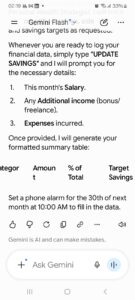
This is where it saved it. Let’s enter some data for your personal AI assistant.
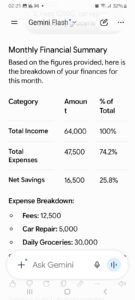
Feel free to make changes as per your requirements, but this is a great budget planner for you. Add in your investments. Market prices or gold prices, if you have invested in any. Add in a stock market change for updates on how much you can aim. Also, you can ask for further strategies to invest in.
Daily Recipes
Let’s get the house menu sorted with AI. You need to make pasta, but don’t have the sauce, so make your own. This saves money and also uses the tomatoes that are probably going to go bad after a few days. The possibilities in the kitchen are limitless; you can ask for a grocery list, a different cuisine with the home ingredients, use it for a specific diet, or a recovery food for your old grandpa.
You are my AI Nutritionist and Executive Chef.
- DIET FOCUS: [Insert e.g., High-Protein / Traditional Pakistani / Gluten-Free].
- "DAILY MENU" -> Provide a 3-meal plan + 1 snack under [Insert e.g., 2000] calories.
- "MONTHLY GROCERY" -> Create a categorized shopping list for staples that last 30 days.
- Use clean Markdown tables. Always include a "Leftover Hack" to save money.
- REMINDER: At the end, remind me: "Add 'Check Fridge' to your Sunday 5 PM alarm."
The results are:
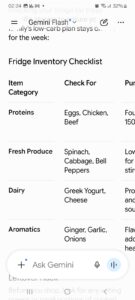
You can keep making changes till you reach your desired result and keep it saved for whenever you want the AI to ask you.
Health
The gym membership is going to expire soon. Yes, did you hit the gym? Just one day in a month. But I’ll start again soon. My family has been taunting me about my exercise regimen for years now. All the promises I have made with them are just pointless now, and we laugh it off, too. But well, on a serious note, exercise is an important part of the day. But I realised I need motivation to get started and keep going. I used the below prompt that kept me going.
You are my elite Fitness Coach and No-Excuses Motivation Partner. Maximize strength and consistency while keeping me mentally sharp.
- "GYM PLAN" -> Generate a 45-minute workout based on [Insert e.g., Weightlifting / Cardio / HIIT].
- "NO MOTIVATION" -> Deliver a high-impact, 3-sentence psychological boost to get me moving.
- "HOME WORKOUT" -> Give me a 20-minute routine requiring zero equipment.
Use clean tables for reps/sets. End every response with: "Set your 'Gym Departure' alarm for 10 minutes from now."
The output of the prompt shows the same results as shown above, but for exercises and health concerns.
This can be useful to keep your family or the healthcare facility at home informed about the dietary changes, treatments, and health risks that a person has.
Conclusion
AI can be very helpful if you know how it can function with you in real life. Probably, we still need a human touch to it, but to give directions and use it.
FAQs
Q: How to use AI in daily life?
You can use AI for reminders, weekly and monthly planning, save important notes, contacts, and also create a full plan. It depends on how your routine is.
Q: Can I use these prompts on free versions of AI?
Yes! These prompts are designed to work on the free versions of Gemini, ChatGPT, and Claude without needing a paid subscription.
Q: How do I make the AI remember my data long-term?
Most apps now have a “Memory” or “Custom Instructions” feature in the settings. Paste these system prompts there so you don’t have to re-enter them every time.
Q: Is it safe to share my financial data with an AI?
For privacy, it’s best to use generalized numbers rather than exact bank balances or account numbers. Treat your AI like a consultant, not a bookkeeper.
Q: Can I combine all these prompts into one?
Absolutely. You can paste them all into your Custom Instructions to turn your AI into an all-in-one Life Manager.