












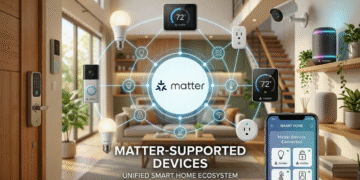


Matter-supported devices is quickly becoming the simplest way for homeowners in the United States to build a fully connected smart home without dealing with compatibility issues, confusing apps, or device limitations.
If you’ve ever tried setting up smart lights, speakers, or locks only to realize they don’t work together, you already understand why Matter is such a big deal.
Smart home technology has been around for years, but it has often been confusing and inconsistent.
One brand would work with Amazon’s Alexa and another brand would only work with Google Home. People who used Apple devices often had few options. Matter is going to change this. It makes a standard that lets devices from brands work together easily.
This guide will tell you everything you need to know about using Matter to make your smart home. It is easy to understand. It will show you how to use Matter-supported devices to build your first smart home.
🌐 What Is Matter and Why It Matters?
It is a universal smart home connectivity standard developed by major tech companies to make our lives easier at home. Instead of forcing users to choose one ecosystem, Matter allows smart devices to communicate across platforms like:
- Apple Home
- Google Home
- Amazon Alexa
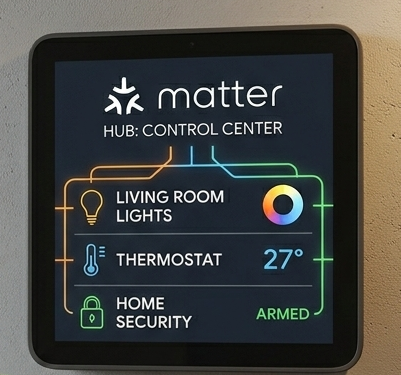
You can use devices from companies and they will still work together. This is really helpful because you do not have to worry about whether they will work together.
Matter is designed to make smart homes:
- Easier to set up
- More reliable
- More secure
- Less dependent on multiple apps
It basically removes the tech hassle from setting up your home.
⚡ Why Matter Is Changing Smart Homes in 2026
The rise of Matter has really changed how smart homes are built and managed.
🔑 Here are the key advantages:
- 🔌 Simple setup with QR code pairing
- 📱 Cross-platform compatibility
- 🏠 Unified control from one app
- ⚡ Faster response through local networking
- 🔒 Improved privacy and reduced cloud dependency
This makes smart homes easier for beginners.
Unlike systems you do not have to worry about if a device works with a certain ecosystem. If a device has Matter certification it will work.
🧠 Best Matter-Supported Devices for Beginners
When you want to make your home smart you do not have to buy it at once. You can start with a setup and then add more Matter-Supported Devices later on.
📊 Common Matter-supported devices:
| Device Type | Examples | Use Case |
| 💡 Smart Bulbs | Philips Hue, Nanoleaf | Lighting control and ambiance |
| 🔌 Smart Plugs | TP-Link Tapo, Eve Energy | Automating appliances |
| 🔐 Smart Locks | Yale, Schlage | Keyless entry and security |
| 🧠 Sensors
|
Motion, door/window sensors | Automation triggers |
| 🎛️ Smart Hubs | Apple HomePod, Google Nest Hub | System control center |
You do not have to build a home all at once. It is better to start with the lighting or smart plugs, in your home. This is often the most practical approach.
🛠️ Step-by-Step Matter Smart Home Setup Guide
Building a smart home with Matter is far simpler than older systems. The process is designed to reduce setup time and eliminate technical confusion.
🧩 Step 1: Choose Your Smart Home Platform
Start by selecting one primary ecosystem:
- Apple Home (HomeKit)
- Google Home
- Amazon Alexa
Using one Smart Home Platform is a good idea because it helps to keep your Smart Home system organized and it is easier to manage.
📡 Step 2: Set Up a Matter Controller
A Matter controller acts as the central hub of your smart home.
Some examples of a Matter controller are:
- Apple HomePod or Apple TV
- Google Nest Hub
- Amazon Echo, the models
This controller connects and manages all your smart devices within your home network.
📲 Step 3: Add Your First Matter Device
Now, that your controller is all set it is really easy to add devices.
You just have to:
- Plug in the device
- Open your home app
- Scan the Matter QR code
- Follow the instructions on the screen
You do not have to do a lot of steps to pair the device or use any other apps.
🏡 Step 4: Organize Devices by Room
After setup, organizing devices makes daily use much easier.
Examples:
- Living room lights
- Bedroom thermostat
- Kitchen appliances
- Front door lock
This structure helps your voice assistants and automations work better.
⚙️ Step 5: Create Smart Automations
This is where Smart Homes really start to feel like “Smart”.
Common examples include:
- Lights turning on at sunset
- Doors locking automatically at night
- Fans activating based on temperature
- Morning routines triggering coffee machines and lights
Start with simple automations before building more complex routines.
📊 Matter vs Traditional Smart Home Systems
Understanding the difference helps highlight why Matter is so impactful.
| Feature | Traditional Smart Home | Matter Smart Home |
| Setup Process | Complicated | Simple QR setup |
| Device Compatibility | Limited to brand ecosystems | Cross-brand support |
| App Usage | Multiple apps needed | One ecosystem control |
| Performance | Cloud-dependent delays | Faster local response |
| User Experience | Fragmented | Unified and simple |
⚠️ Common Mistakes to Avoid
- Buying non-Matter devices unintentionally
- Using multiple smart ecosystems at once
- Ignoring Wi-Fi strength and coverage
- Overcomplicating automations early
- Skipping software updates
📶 Tips for a Smart Home Experience
To ensure a reliable setup, a few practical tips can make a big difference:
- 📍 You should place your router in a central location.
- 📡 It is an idea to use 2.4GHz Wi-Fi for things like smart devices
- 🔁 If you need to restart your devices after you set them up for the first time
- 🔐 You should use passwords that are hard to guess and turn on two-factor authentication
- 🧩 Choose certified Matter devices whenever possible
These small steps will help your router and devices work better and be more stable, over time.
🔮 The Future of Smart Homes with Matter
The smart home industry is getting closer to being completely automatic and easy to use.
With Matter expanding, future homes are expected to feature:
- Seamless cross-brand integration
- AI-driven automation systems
- Lower-cost smart devices
- Improved energy efficiency management
- Fully adaptive home environments
Smart homes are becoming a normal part of life just like Wi-Fi or electricity. They are not just tech anymore.
🏁 Final Thoughts
Making a home in 2026 is not that hard anymore. The Matter system makes it easy for almost anyone.
The important thing is to not try to do much at the start. A successful setup usually starts small and expands gradually over time.
This Guide to Matter-Supported Devices shows us that the best part of home technology is not having a lot of devices. But having the right Matter smart home devices that work well together.
💬 What Would You Build First?
Smart home technology is getting better and better. Matter is making it really easy to use.
- If you were going to start using home technology today, what would you pick first?
- Would you choose lighting because it is convenient?
- Would you choose smart security because it gives you peace of mind?
- Or want a fully voice-controlled home setup?
And for those already using smart devices—what has been your biggest challenge or most useful automation so far?
Sharing real experiences helps others build smarter and more practical home setups, especially as this technology continues to grow.